Joseki
Usage
Joseki brings together datasets of thermophysical properties of Earth’s atmosphere relevant for radiative transfer applications, and provides utilities to compute common characteristic quantities and perform operations such as interpolation and rescaling on generated atmospheric thermophysical property datasets.
Basics
The main interface of Joseki is the make() function.
It creates an atmospheric profile corresponding to a given identifier.
For example, the so-called AFGL US Standard atmospheric profile
[ACC+86] is created with:
import joseki

ds = joseki.make(identifier="afgl_1986-us_standard")
The list of valid identifiers can be accessed either using the identifiers()
function:
joseki.identifiers()
or using the command-line interface:
joseki --help
The created profile is returned as an xarray dataset which can then be exported to various formats, e.g. NetCDF:
ds.to_netcdf("my_dataset.nc")
Tip
For other formats, refer to the xarray IO documentation.
Altitude grid
You can specify the altitude grid for your atmospheric profile using the z
argument of the make() function. It accepts
a
pint.Quantityinstance:from joseki import unit_registry as ureg ds = joseki.make( identifier="afgl_1986-us_standard", z=[0, 10, 20, 30, 40, 50, 60, 70, 80, 90, 100] * ureg.km, )
or a dictionary that holds keyword arguments passed to the
pint.Quantityconstructor:ds = joseki.make( identifier="afgl_1986-us_standard", z={ "value": [0, 10, 20, 30, 40, 50, 60, 70, 80, 90, 100], "units": "km", }, )
Note
Like Eradiate, Joseki uses Pint’s
application registry for easy
integration in a Pint-powered environment.
All Pint quantity initialization patterns are supported, such as using a Numpy array to specify the altitude grid:
import numpy as np

ds = joseki.make(
    identifier="afgl_1986-us_standard",
    z=np.linspace(0, 100, 51) * ureg.km,
)
If the source atmospheric profile is based on tabulated data, it will be interpolated on the specified altitude grid.
When interpolating, the column number densities associated with the different
atmospheric constituents will likely change. However, it is often desirable to
conserve total column number density, so that such resampling does not result in
a loss of mass. To ensure column densities are conserved during interpolation,
set the conserve_column parameter to True:
ds = joseki.make(
    identifier="afgl_1986-us_standard",
    z=np.linspace(0, 100, 51) * ureg.km,
    conserve_column=True,
)
Molecule selection
The optional molecules parameter can be used to restrict the list of molecules
included in the generated profile:
ds = joseki.make(
    identifier="afgl_1986-us_standard",
    molecules=["H2O", "CO2", "O3"],
)
The atmospheric profiles defined by
Anderson et al. [ACC+86] include mole fraction
data for 28 molecules, where molecules 8-28 are described as additional.
By default, these additional molecules are included in the atmospheric profile.
To discard these additional molecules, set the additional_molecules
parameter to False:
ds = joseki.make(
    identifier="afgl_1986-us_standard",
    additional_molecules=False,
)
The resulting dataset now includes only 7 molecules, instead of 28.
Derived quantities
Joseki can compute derived quantities from a thermophysical property profile
(either generated by Joseki, or externally). For that purpose, the joseki
xarray accessor is the preferred interface. The following quantities can be
computed:
column number density [
JosekiAccessor.column_number_density]:ds.joseki.column_number_density["O3"].to("dobson_unit")column mass density [
JosekiAccessor.column_mass_density]:ds.joseki.column_mass_density["H2O"]number density at sea level [
JosekiAccessor.number_density_at_sea_level]:ds.joseki.number_density_at_sea_level["CO2"]mass density at sea level [
JosekiAccessor.mass_density_at_sea_level]:ds.joseki.mass_density_at_sea_level["CH4"]
Rescaling
The amount of one or several molecules in a thermophysical property dataset can be
modified with a rescaling transformation, using the rescale()
method:
rescaled = ds.joseki.rescale(factors={"H2O": 0.5, "CO2": 1.5, "CH4": 1.1})
This operator applies a multiplier to the current number densities for the
specified molecules.
When a rescale transformation is applied to a dataset, its history
attribute is updated to keep track of the scaling factors that were applied.
Rescaling can also be parametrized by a target amount using the
rescale_to() method. In that case, Joseki computes and
applies the appropriate scaling factor:
rescaled = ds.joseki.rescale_to(
   target={
      "H2O": 25 * ureg("kg / m**2"),
      "CO2": 420 * ureg("ppm"),
      "O3": 280 * ureg("dobson_unit"),
   }
)
Plotting examples
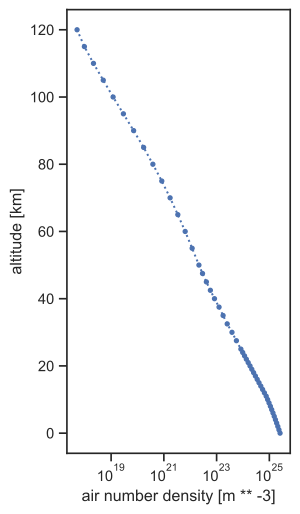
The xarray library, which powers Joseki, offers various plotting features that can be leveraged to explore thermophysical property profiles. The following shows a few examples that use the Matplotlib library.
All dataset variables (air pressure p, air temperature t,
air number density n or species mole fractions x_*) can be plotted
individually. Here are a few plotting code examples:
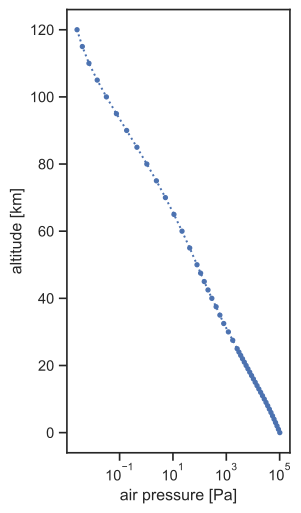
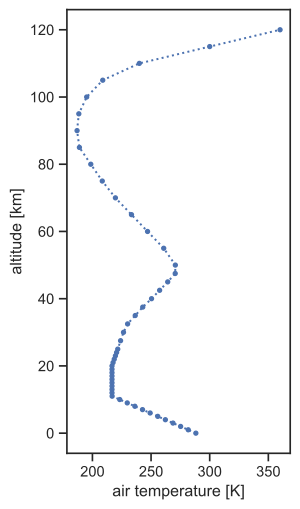
ds = joseki.make(identifier="afgl_1986-us_standard", additional_molecules=False)
ds.p.plot(figsize=(3, 6), ls="dotted", marker=".", y="z", xscale="log")

ds.t.plot(figsize=(3, 6), ls="dotted", marker=".", y="z")

ds.n.plot(figsize=(3, 6), ls="dotted", marker=".", y="z", xscale="log")

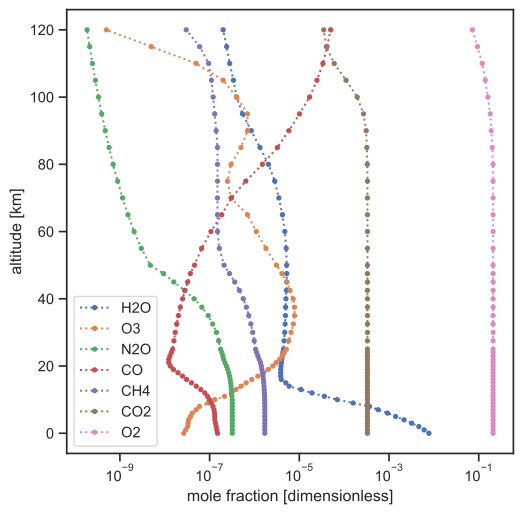
plt.figure(figsize=(6, 6))

for m in ds.joseki.molecules:
   ds[f"x_{m}"].plot(ls="dotted", marker=".", y="z", xscale="log")

plt.xlabel("mole fraction [dimensionless]")
plt.legend(ds.joseki.molecules)